 Volumora
Volumora vs OmniDiskSweeper
From a sorted list to the full picture: an OmniDiskSweeper alternative
OmniDiskSweeper, from The Omni Group, has been a quiet favourite for years. In Omni's own words, it shows the files on your drive from largest to smallest and lets you quickly Trash or open them. It is free to download, the current build is version 1.16 from September 2025, and Omni still offers older builds for Macs going all the way back to Mac OS X 10.4.
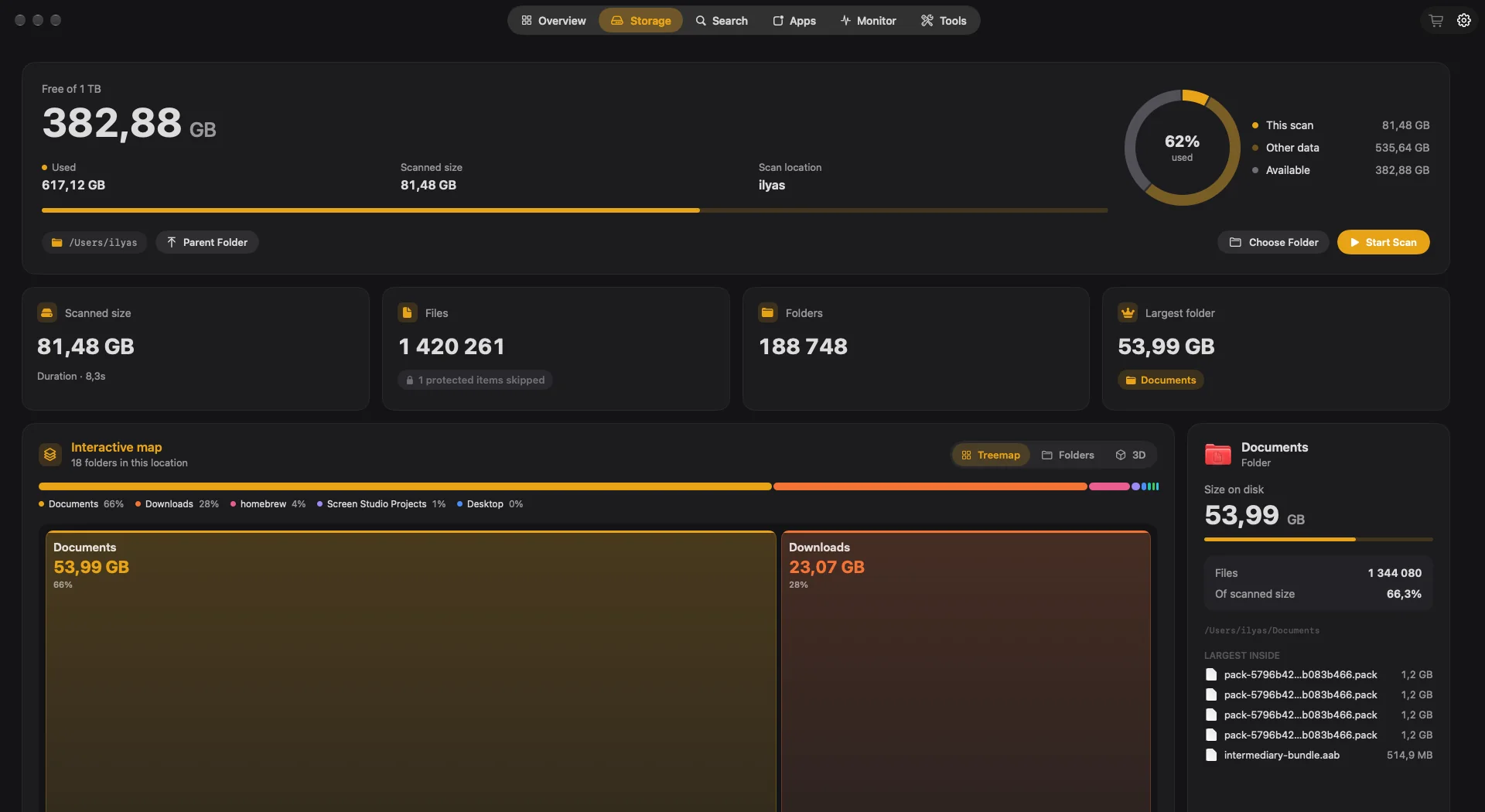
A sorted list is honest and fast to read, but it hides proportion: a folder that is 40% of your disk looks like any other row. Volumora gives you the same ranking in its Folders view and adds a treemap that makes proportion obvious, then tools to act on what you find. Here is a fair look at both.
- OmniDiskSweeper from The Omni Group
- Free
- current OmniDiskSweeper build, September 2025
- 1.16
- Volumora scanning 1.34M files in our benchmark
- 7.8 s
Volumora and OmniDiskSweeper, feature by feature
| Feature | Volumora | OmniDiskSweeper |
|---|---|---|
| Disk visualization | Treemap, ranked Folders and 3D views of the same scan | Sorted list, largest to smallest |
| Scanning | Parallel scanner: 1.34M files (54 GB) in 7.8 s in our benchmark | Browse a drive by size; Trash or open items directly |
| Duplicate finder | Yes, matched by SHA-256 content hash | Not listed |
| App uninstaller & leftovers | Yes, with leftover discovery; moves to Trash only | Not listed |
| Live system monitor | CPU, memory breakdown, disk I/O, network, battery, top apps | Not listed |
| Dev-server Projects view | Yes: Node, Bun, Deno, Python, Ruby and more, with ports, memory and idle status | Not listed |
| Menu bar panel | Yes: health status, live tiles, per-area tabs, 4 item styles | Not listed |
| Privacy / on-device | All analysis on-device; only license activation uses the network; no analytics | Not specified on the official page |
| Pricing model | Free scan and map; one-time license for up to 3 Macs | Free download |
| Platform requirements | macOS 14+, Apple Silicon and Intel | Current build 1.16; legacy builds for Mac OS X 10.4 to macOS 10.13 |
| Languages | English and Arabic (full right-to-left) | Not specified on the official page |
“Not listed” means we did not find the feature on the product's official pages. Checked September 2026.
Where OmniDiskSweeper is the better fit
No single app is right for everyone. These are the cases where we think staying with the other app is the better call.
- 01
You want zero cost and zero setup
OmniDiskSweeper is a free download with nothing to buy and nothing to configure. For a one-off hunt for big files, that is hard to beat.
- 02
You think in lists, not pictures
Some people simply read a size-sorted list faster than any chart. OmniDiskSweeper is built entirely around that list, with nothing else competing for attention.
- 03
You are maintaining a very old Mac
The Omni Group still hosts builds for Mac OS X 10.4 through macOS 10.13. Volumora requires macOS 14, so it is not an option on those machines.
Why people switch to Volumora
See proportion, not just order
Volumora's treemap draws each folder at its true size, so the one folder eating half your disk is impossible to miss. The Folders view keeps the ranked list for when you want it.
Know what is safe to remove
Smart Cleanup groups caches, logs and installers for review, and Large & Forgotten surfaces big, old files worth a second look. You decide; approved items go to the Trash.
Find duplicates by content
The duplicate finder compares SHA-256 hashes, so two files with different names but identical content are caught, and look-alikes with different content are not.
Remove apps properly
Uninstalling from Volumora also finds the app's Application Support files, caches, preferences, containers and launch items.
More than storage
A live monitor, a menu bar panel with a health status, and a Projects view for dev servers make Volumora useful between cleanups too.
How to try Volumora alongside it
- 1
Keep OmniDiskSweeper for quick checks if you like it.
- 2
Download Volumora and grant Full Disk Access so protected folders are measured.
- 3
Scan your home folder and open the Folders view: the ranking will feel familiar.
- 4
Switch to the Treemap to see the same data by proportion, and select a folder to open the inspector.
- 5
Run Smart Cleanup or the duplicate finder in review mode, and buy a license only if you want Volumora to carry out the cleanup.
See your own Mac before you decide.
The scan and the storage map are free. Buy the one-time license only when you want Volumora to carry out the cleanup.
- Every tool in the app
- Up to 3 personal Macs
- Future 1.x updates
- 14-day refund promise
macOS 14 or newer · Apple Silicon and Intel
Frequently asked questions
Is OmniDiskSweeper still updated?
Yes. As of September 2026, The Omni Group's latest download link serves OmniDiskSweeper 1.16, published in September 2025.
Does Volumora have a sorted list view?
Yes. The Folders view shows ranked folder cards, largest first, and the Overview lists your largest folders from the latest scan.
Does Volumora delete files immediately?
No. Volumora never deletes on its own. Items you approve are moved to the macOS Trash, where you can still restore them.
Is Volumora free like OmniDiskSweeper?
Partly. The scan and storage map are free. The cleanup tools, duplicate finder and uninstaller need a one-time license for up to three Macs.