 Volumora
Volumora vs Disk Inventory X
Looking past Disk Inventory X? A treemap analyzer for today's macOS
Disk Inventory X helped make treemaps familiar to Mac users. It is free, released under the GPL, and draws the sizes of files and folders as a treemap whose layout algorithm is based on KDirStat, the same family of tools that inspired WinDirStat on Windows. Its official site lists version 1.3 for macOS 10.13 through 10.15.
If your Mac runs a newer macOS than that, check the developer's site before relying on it; we have not tested it on current releases and will not guess. Volumora is built for macOS 14 and later on Apple Silicon and Intel, keeps the treemap as its default view, and adds the tools you reach for after the map has shown you the problem.
- Disk Inventory X's license
- GPL
- newest macOS on its official download listing
- 10.15
- the macOS versions Volumora is built for
- 14+
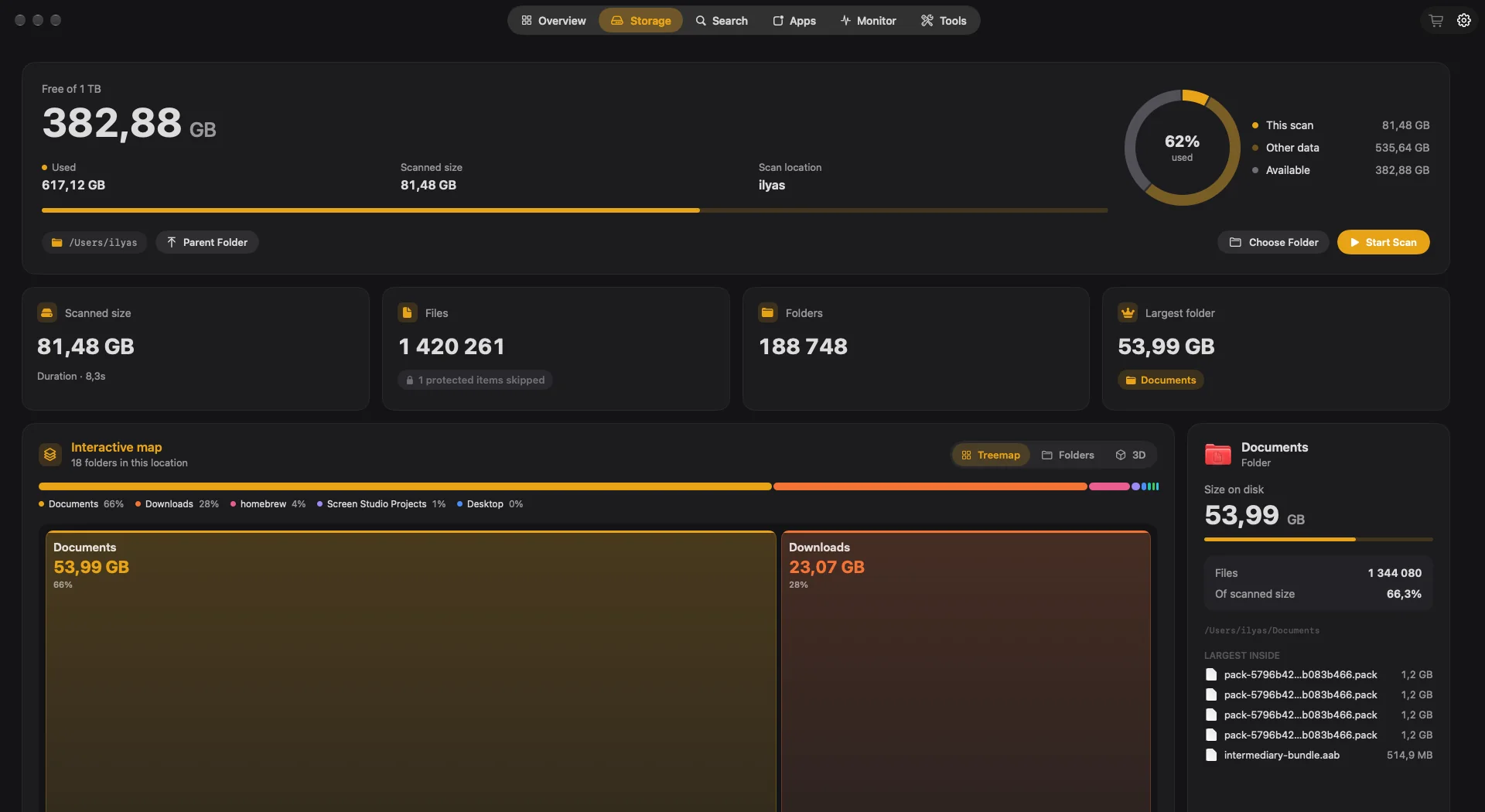
Volumora and Disk Inventory X, feature by feature
| Feature | Volumora | Disk Inventory X |
|---|---|---|
| Disk visualization | Treemap, ranked Folders and 3D views of the same scan | Treemap (layout based on KDirStat) |
| Scanning | Parallel scanner: 1.34M files (54 GB) in 7.8 s in our benchmark | Shows file and folder sizes as a treemap |
| Duplicate finder | Yes, matched by SHA-256 content hash | Not listed |
| App uninstaller & leftovers | Yes, with leftover discovery; moves to Trash only | Not listed |
| Live system monitor | CPU, memory breakdown, disk I/O, network, battery, top apps | Not listed |
| Dev-server Projects view | Yes: Node, Bun, Deno, Python, Ruby and more, with ports, memory and idle status | Not listed |
| Menu bar panel | Yes: health status, live tiles, per-area tabs, 4 item styles | Not listed |
| Privacy / on-device | All analysis on-device; only license activation uses the network; no analytics | Open-source code under the GPL |
| Pricing model | Free scan and map; one-time license for up to 3 Macs | Free (GPL) |
| Platform requirements | macOS 14+, Apple Silicon and Intel | Version 1.3 listed for macOS 10.13 to 10.15 |
| Languages | English and Arabic (full right-to-left) | Not specified on the official page |
“Not listed” means we did not find the feature on the product's official pages. Checked September 2026.
Where Disk Inventory X is the better fit
No single app is right for everyone. These are the cases where we think staying with the other app is the better call.
- 01
Your Mac runs macOS 10.13 to 10.15
That is exactly the range Disk Inventory X 1.3 lists. Volumora needs macOS 14 or later, so on High Sierra, Mojave or Catalina, Disk Inventory X is the one to use.
- 02
You want free, open-source software
Disk Inventory X is GPL software. You can read the code, and it costs nothing. Volumora is a commercial app.
- 03
You are coming from WinDirStat
If you already know the KDirStat and WinDirStat style of treemap from Windows or Linux, Disk Inventory X will feel immediately familiar.
Why people switch to Volumora
Built for current macOS
Volumora is a native app for macOS 14 and later that runs on Apple Silicon and Intel. It asks for Full Disk Access so it can measure the folders modern macOS protects.
A treemap, plus two more views
The treemap is Volumora's default. Double-click to scan inside a tile, switch to ranked folder cards or a 3D landscape, and select any folder to see its size, share and largest files.
A parallel scanner
Volumora reads folders on all of your Mac's cores at once. In our benchmark it scanned 1.34 million files (54 GB) in 7.8 seconds, down from 66 seconds with its previous scanner.
Tools that act on the map
Smart Cleanup, Large & Forgotten files, a SHA-256 duplicate finder, an uninstaller with leftovers and Developer Cleanup. You review everything, and approved items go to the Trash.
Monitoring and Projects
Live CPU, memory, disk, network and battery, a menu bar panel with a health status, and a view of the dev servers running on your Mac.
How to try Volumora alongside it
- 1
Check your macOS version in the Apple menu under About This Mac. Volumora needs macOS 14 or later.
- 2
Download Volumora and grant Full Disk Access when prompted.
- 3
Scan your startup disk; the treemap will look familiar if you have used Disk Inventory X.
- 4
Double-click the biggest tile to drill in, and use the inspector to find the largest files inside.
- 5
Review Smart Cleanup suggestions, and buy the one-time license if you want Volumora to carry them out.
See your own Mac before you decide.
The scan and the storage map are free. Buy the one-time license only when you want Volumora to carry out the cleanup.
- Every tool in the app
- Up to 3 personal Macs
- Future 1.x updates
- 14-day refund promise
macOS 14 or newer · Apple Silicon and Intel
Frequently asked questions
Does Disk Inventory X run on macOS 14 or 15?
Its official site lists version 1.3 for macOS 10.13 to 10.15. We have not tested it on newer releases, so check the developer's site for current compatibility.
Is Volumora's treemap similar?
Yes, in spirit: each tile's area is its size, and you can double-click to scan inside. Volumora also offers Folders and 3D views of the same scan.
Is Disk Inventory X free?
Yes. It is free and released under the GNU GPL.
What does Volumora cost?
The scan and storage map are free. The cleanup tools come with a one-time license for up to three personal Macs, with a 14-day refund promise.