 Volumora
Volumora vs GrandPerspective
Outgrown GrandPerspective's treemap? Here is what Volumora adds
GrandPerspective is one of the nicest things about the Mac utility scene: a free, open-source treemap released under the GPL, still actively maintained (version 3.8.1 shipped in September 2026), with the same app available on the Mac App Store for $2.99 if you want to support its developer. It draws every file as a block sized by how much space it takes, and gives you serious filtering, saved scans and multiple views.
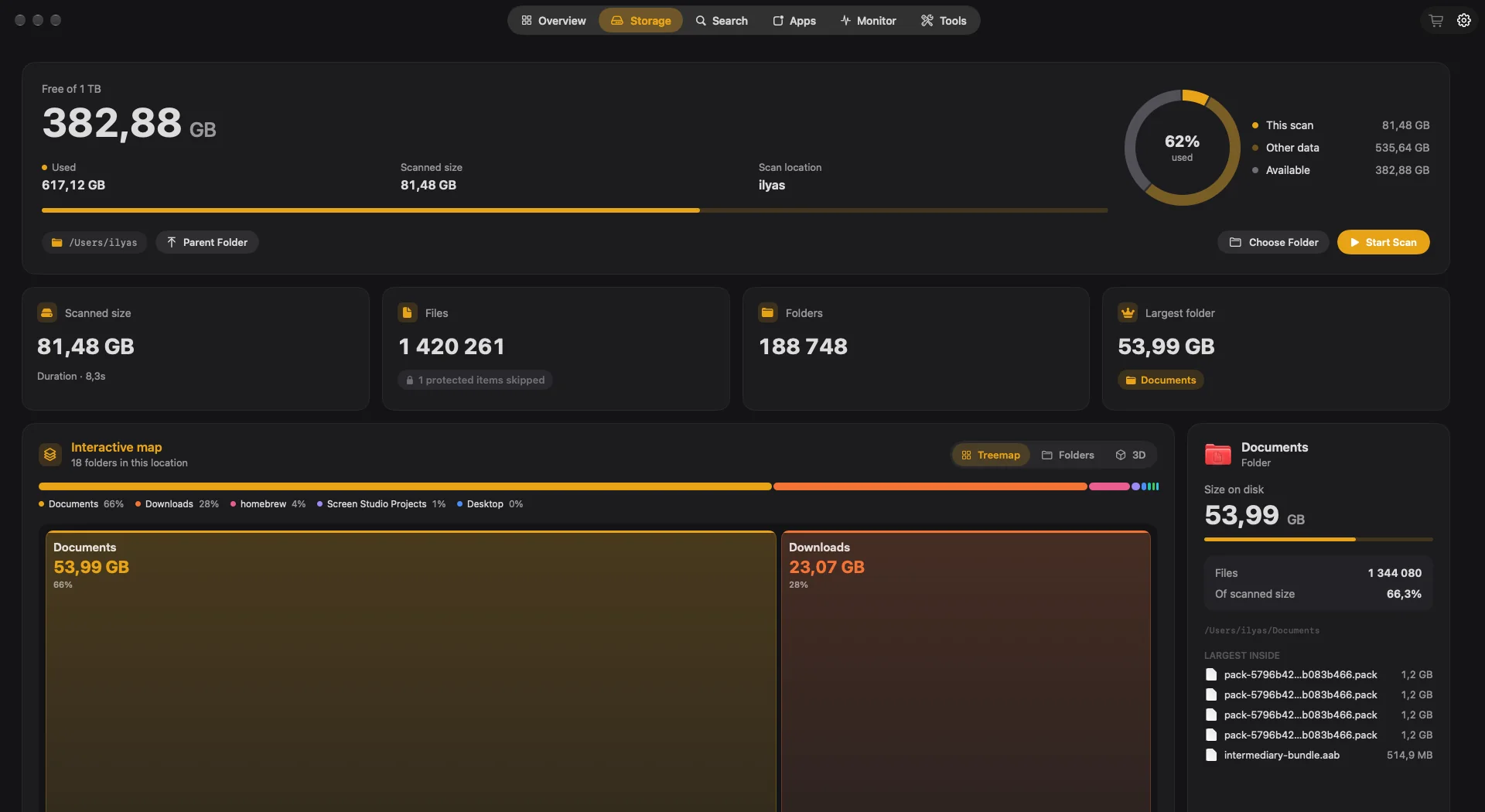
Volumora uses a treemap too; it is the default view of its storage map. The difference is what surrounds it. Volumora adds folder cards and a 3D view of the same scan, then tools that act on what you find, a live system monitor and a Projects view for dev servers. If you are happy with a map alone, GrandPerspective may be all you need. If you keep switching to other apps after the map, read on.
- GrandPerspective's open-source license
- GPL
- GrandPerspective on the Mac App Store
- $2.99
- views of each Volumora scan
- 3
Volumora and GrandPerspective, feature by feature
| Feature | Volumora | GrandPerspective |
|---|---|---|
| Disk visualization | Treemap, ranked Folders and 3D views of the same scan | Treemap, with multiple views of a scan |
| Scanning | Parallel scanner: 1.34M files (54 GB) in 7.8 s in our benchmark | Save and reload scans; filter by name, path, size, type and hard-link status |
| Duplicate finder | Yes, matched by SHA-256 content hash | Not listed |
| App uninstaller & leftovers | Yes, with leftover discovery; moves to Trash only | Not listed |
| Live system monitor | CPU, memory breakdown, disk I/O, network, battery, top apps | Not listed |
| Dev-server Projects view | Yes: Node, Bun, Deno, Python, Ruby and more, with ports, memory and idle status | Not listed |
| Menu bar panel | Yes: health status, live tiles, per-area tabs, 4 item styles | Not listed |
| Privacy / on-device | All analysis on-device; only license activation uses the network; no analytics | Open-source code you can inspect |
| Pricing model | Free scan and map; one-time license for up to 3 Macs | Free (GPL) from SourceForge; $2.99 on the Mac App Store |
| Platform requirements | macOS 14+, Apple Silicon and Intel | macOS 14+, Apple silicon and Intel |
| Languages | English and Arabic (full right-to-left) | Nine complete translations; Arabic not listed |
“Not listed” means we did not find the feature on the product's official pages. Checked September 2026.
Where GrandPerspective is the better fit
No single app is right for everyone. These are the cases where we think staying with the other app is the better call.
- 01
You want free and open source
GrandPerspective is GPL software you can download at no cost, read, and build yourself. Volumora is a commercial, closed-source app. If auditing the code matters more to you than extra features, GrandPerspective wins.
- 02
You live in filters and saved scans
Its filter tests combine name, path, size, file type and hard-link status, and you can save a scan and reload it later to compare. That is a deep, power-user feature set built around the treemap itself.
- 03
You want a treemap and nothing else
A single-purpose tool has less to learn and less running on your Mac. If you never need an uninstaller, duplicate finder or monitor, there is no reason to switch.
- 04
You prefer one of its languages
GrandPerspective is fully translated into English, Chinese (Simplified), Finnish, French, German, Italian, Spanish, Turkish and Dutch. Volumora is available in English and Arabic only.
Why people switch to Volumora
The same scan, three ways
The treemap is where Volumora starts. Switch to ranked folder cards when you want a list, or to a 3D landscape when you want to see scale at a glance, without scanning again. Double-click a tile to scan inside it.
From finding to fixing
A duplicate finder that matches files by SHA-256 content, Smart Cleanup for caches, logs and installers, Large & Forgotten files, Developer Cleanup, and an uninstaller with leftovers. Everything is reviewed first and moved to the Trash.
Storage history
Volumora records how your disk usage changes over time, so you can see when space started disappearing rather than only where it went.
Your Mac's live state
The Monitor tab and menu bar panel show CPU, memory, disk activity, network and battery, with the apps behind each number, and a health status that flags low disk space.
Projects for developers
Find the dev servers still running from last week, with their ports and memory, and stop idle ones after you confirm.
How to try Volumora alongside it
- 1
Keep GrandPerspective. Both apps read your disk without changing it until you act.
- 2
Download Volumora and grant Full Disk Access so both tools see the same protected folders.
- 3
Scan the same folder in each and compare the treemaps side by side.
- 4
Switch Volumora to the Folders and 3D views and open the inspector on your largest folder.
- 5
Try a duplicate scan on your Downloads folder, then decide whether the extra tools are worth a one-time license.
See your own Mac before you decide.
The scan and the storage map are free. Buy the one-time license only when you want Volumora to carry out the cleanup.
- Every tool in the app
- Up to 3 personal Macs
- Future 1.x updates
- 14-day refund promise
macOS 14 or newer · Apple Silicon and Intel
Frequently asked questions
Is GrandPerspective really free?
Yes. It is open source under the GNU GPL and free to download from SourceForge. The developer also sells the same application on the Mac App Store for $2.99.
Does Volumora use a treemap too?
Yes. The treemap is Volumora's default storage view: each tile's area is its size. Folders and 3D views read from the same scan.
Which one runs on older Macs?
Neither, as of September 2026. GrandPerspective 3.8.1 and Volumora both require macOS 14 or later, and both run on Apple silicon and Intel.
Is Volumora open source?
No. Volumora is a commercial app. Its privacy comes from its design: analysis runs on your Mac, there is no analytics SDK, and only license activation contacts the network.