 Volumora
Volumora vs DaisyDisk
A DaisyDisk alternative for people who want more than a disk map
DaisyDisk has earned its reputation. Its circular map is one of the quickest ways to see where your space went, it costs $9.99 once for up to five Macs, and its App Store privacy label says the developer collects no data. If a beautiful map and a way to delete what you find is all you need, it is hard to argue with.
Volumora starts from the same question, what is filling my disk, and then keeps going. The storage map sits next to a duplicate finder, an uninstaller that catches leftovers, a live system monitor and a Projects view that finds the dev servers you forgot to stop. Everything runs on your Mac. Below is a plain comparison, including the cases where DaisyDisk is the better choice.
- DaisyDisk, one-time, up to 5 Macs
- $9.99
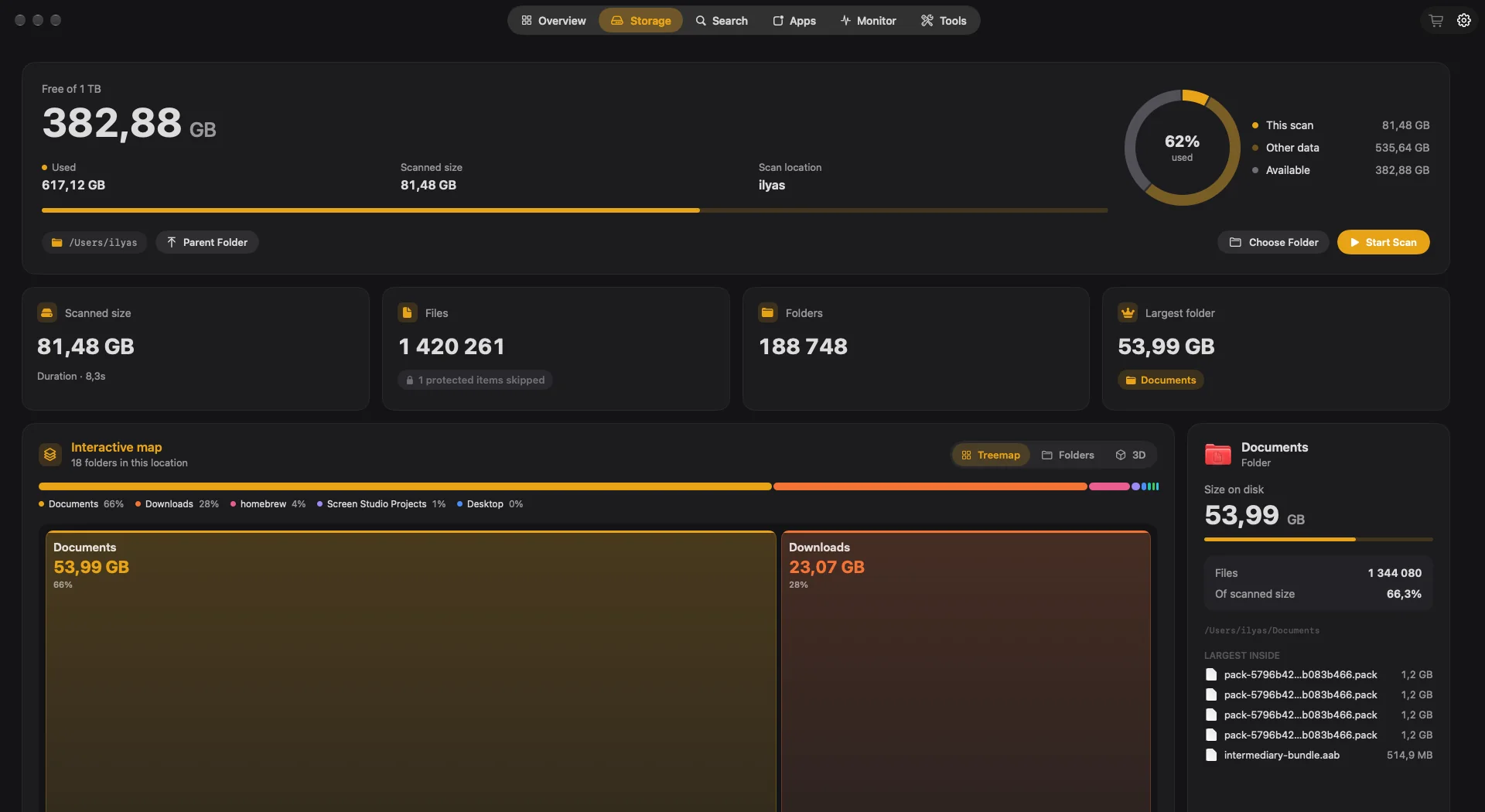
- Volumora scanning 1.34M files in our benchmark
- 7.8 s
- ways to read a Volumora scan
- 3
Volumora and DaisyDisk, feature by feature
| Feature | Volumora | DaisyDisk |
|---|---|---|
| Disk visualization | Treemap, ranked Folders and 3D views of the same scan | Interactive circular (ring) map |
| Scanning | Parallel scanner: 1.34M files (54 GB) in 7.8 s in our benchmark | Fast scans; administrator scanning in the full version |
| Duplicate finder | Yes, matched by SHA-256 content hash | Not listed |
| App uninstaller & leftovers | Yes, with leftover discovery; moves to Trash only | Not listed |
| Live system monitor | CPU, memory breakdown, disk I/O, network, battery, top apps | Not listed |
| Dev-server Projects view | Yes: Node, Bun, Deno, Python, Ruby and more, with ports, memory and idle status | Not listed |
| Menu bar panel | Yes: health status, live tiles, per-area tabs, 4 item styles | Not listed |
| Privacy / on-device | All analysis on-device; only license activation uses the network; no analytics | App Store label: developer collects no data |
| Pricing model | Free scan and map; one-time license for up to 3 Macs | $9.99 one-time for up to 5 Macs; the free trial cannot delete files |
| Platform requirements | macOS 14+, Apple Silicon and Intel | macOS 10.13+, Apple Silicon supported |
| Languages | English and Arabic (full right-to-left) | English plus 13 other languages; Arabic not listed |
“Not listed” means we did not find the feature on the product's official pages. Checked September 2026.
Where DaisyDisk is the better fit
No single app is right for everyone. These are the cases where we think staying with the other app is the better call.
- 01
Your Mac runs an older macOS
DaisyDisk supports macOS 10.13 High Sierra and newer. Volumora needs macOS 14 Sonoma or later, so on an older Mac DaisyDisk is the one that will actually install.
- 02
Your space problem lives in the cloud or on a NAS
The full version of DaisyDisk can scan Dropbox, Google Drive, OneDrive and Box as well as network drives. Cloud-drive scanning is not one of Volumora's features, so if that is your main need, DaisyDisk is designed for it.
- 03
You manage five Macs on one license
A DaisyDisk license covers up to five personal Macs. Volumora's covers three. For a larger household the arithmetic favours DaisyDisk.
- 04
You want one focused tool
DaisyDisk does one job with a lot of polish, including revealing hidden space and purging purgeable space in the full version. If you never want a monitor or an uninstaller, a single-purpose app is a perfectly good choice.
Why people switch to Volumora
One app instead of three
After the map shows you the problem, Volumora can act on it: a duplicate finder that compares SHA-256 content hashes, an uninstaller that finds Application Support, cache, preference and container leftovers, and a Smart Cleanup that lists caches, logs and installers for review.
The live picture, not only the disk
The Monitor tab shows CPU load, a memory breakdown with pressure and swap, disk read and write speed, network rates and battery health, each with the apps behind the numbers. The menu bar panel keeps a health status one click away.
Made with developers in mind
Projects groups running dev servers by folder, shows their ports and memory, and tells working servers from idle ones. Developer Cleanup recovers build output and package caches, the kind of space a general disk map shows but cannot explain.
Three ways to read one scan
Switch between a treemap, ranked folder cards and a 3D landscape without rescanning. The inspector shows a folder's size, its share of the scan and the largest files inside.
A complete Arabic interface
Volumora ships in English and Arabic, with navigation, controls, dashboards and maps mirrored right to left. Arabic is not among DaisyDisk's listed languages.
How to try Volumora alongside it
- 1
Keep DaisyDisk where it is. You do not need to remove it to try Volumora.
- 2
Download Volumora and grant Full Disk Access when asked, so macOS lets it measure protected folders.
- 3
Run the free scan of your startup disk and compare the largest folders with what DaisyDisk showed. Small differences are normal, because analyzers count clones, hard links and purgeable space differently.
- 4
Open the Monitor and Projects tabs to see what a disk-only tool does not cover.
- 5
Buy the one-time license only if you want Volumora to carry out cleanup. Everything it removes goes to the Trash first.
See your own Mac before you decide.
The scan and the storage map are free. Buy the one-time license only when you want Volumora to carry out the cleanup.
- Every tool in the app
- Up to 3 personal Macs
- Future 1.x updates
- 14-day refund promise
macOS 14 or newer · Apple Silicon and Intel
Frequently asked questions
Is Volumora faster than DaisyDisk?
We have not run a head-to-head benchmark, so we will not claim one. What we measured: Volumora's parallel scanner read a 54 GB folder of 1.34 million files in 7.8 seconds, down from 66 seconds with our previous scanner. Your time depends on your disk and file count.
Can either free version delete files?
Not fully. According to DaisyDisk's own comparison, its free trial cannot delete files. In Volumora the scan and storage map are free, and cleanup tools need the one-time license.
Does Volumora scan Dropbox or Google Drive like DaisyDisk?
Cloud-drive scanning is not one of Volumora's features. If you need to analyze Dropbox, Google Drive, OneDrive or Box, DaisyDisk's full version supports them.
Is either app a subscription?
No. DaisyDisk is a one-time $9.99 purchase. Volumora is a one-time license for up to three Macs that includes future 1.x updates.