 Volumora
Volumora vs iStat Menus
An iStat Menus alternative for people who also need disk space back
iStat Menus from Bjango is the reference point for Mac menu bar monitoring. It tracks CPU, GPU, memory, disks, network, sensors and battery, and adds S.M.A.R.T. status, fan control, Bluetooth battery levels, rules and notifications, weather, world clocks and a combined mode that folds several items into one. Bjango sells it as a license with paid major upgrades, offers a 14-day trial, and says the app has no ads, analytics or tracking.
Volumora is not a like-for-like replacement, and we will not pretend otherwise. Its monitor covers CPU, memory, disk, network, battery and top apps, without GPU, sensors or fan control. What it adds is everything around the numbers: a storage map for when the disk fills up, cleanup tools, and a Projects view that shows which dev servers are behind that CPU and memory use.
- iStat Menus free trial
- 14 days
- Volumora menu bar tabs, from Overview to Projects
- 6
- Volumora menu bar item styles
- 4
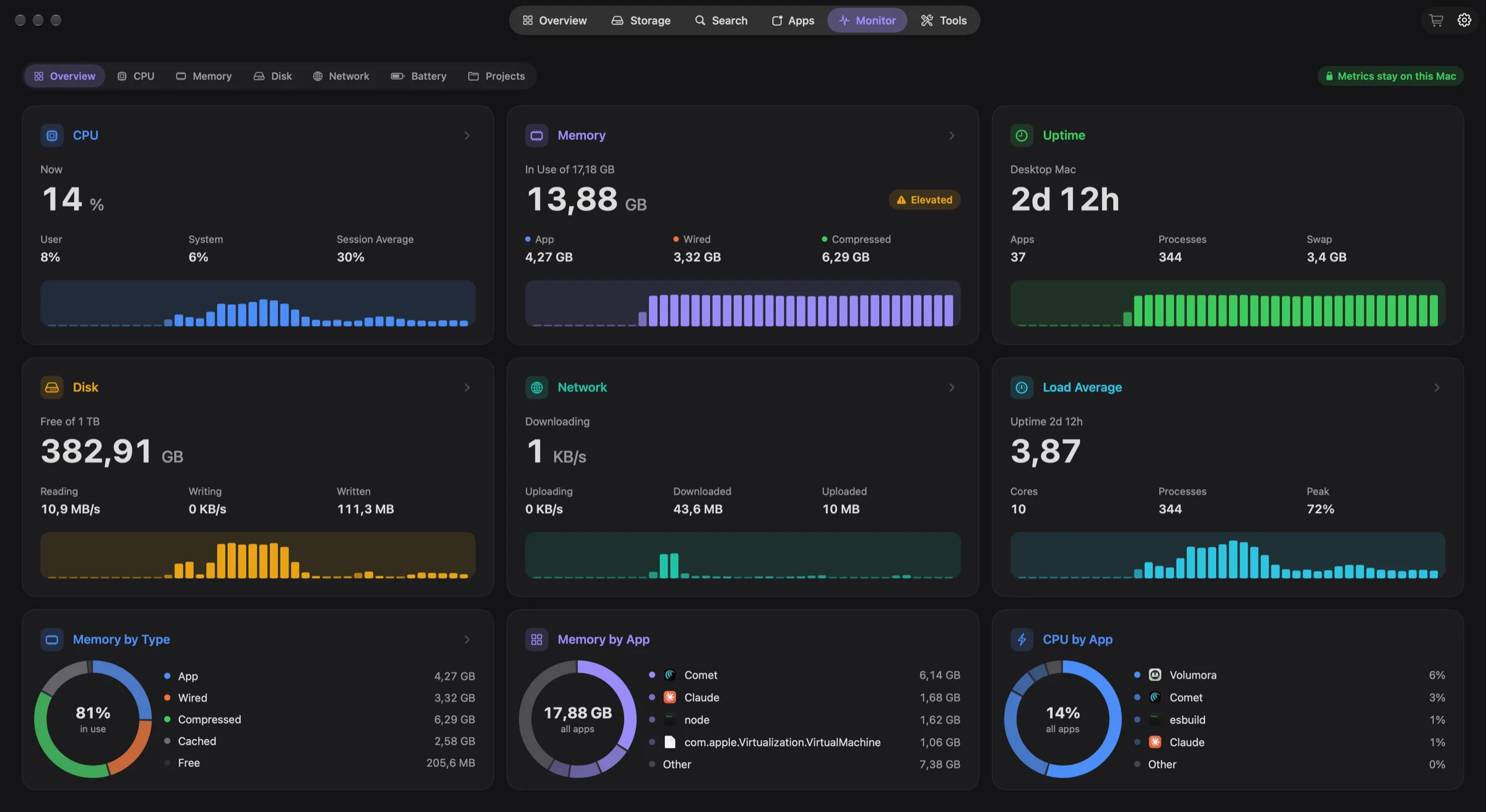
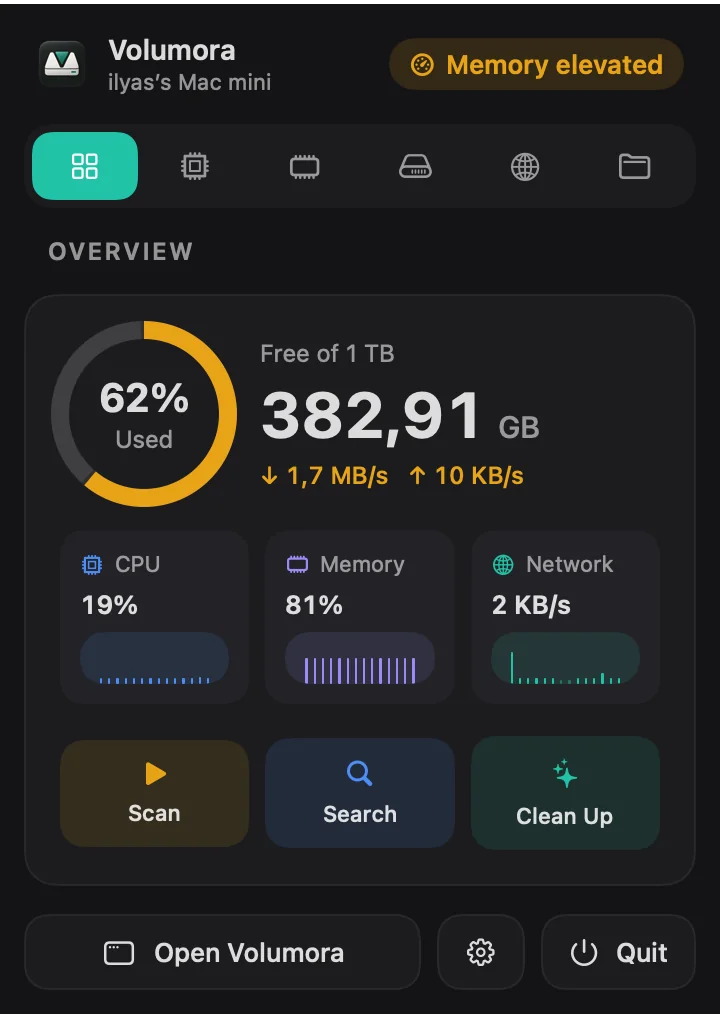
Volumora and iStat Menus, feature by feature
| Feature | Volumora | iStat Menus |
|---|---|---|
| Disk visualization | Treemap, ranked Folders and 3D views of the same scan | Disk usage in the menu bar; no folder map listed |
| Scanning | Parallel scanner: 1.34M files (54 GB) in 7.8 s in our benchmark | Not listed |
| Duplicate finder | Yes, matched by SHA-256 content hash | Not listed |
| App uninstaller & leftovers | Yes, with leftover discovery; moves to Trash only | Not listed |
| Live system monitor | CPU, memory breakdown, disk I/O, network, battery, top apps | CPU, GPU, memory, disks, network, sensors, battery, fans |
| Dev-server Projects view | Yes: Node, Bun, Deno, Python, Ruby and more, with ports, memory and idle status | Not listed |
| Menu bar panel | Yes: health status, live tiles, per-area tabs, 4 item styles | Yes: highly customizable items, combined mode, rules and notifications |
| Privacy / on-device | All analysis on-device; only license activation uses the network; no analytics | Bjango states no ads, analytics or tracking |
| Pricing model | Free scan and map; one-time license for up to 3 Macs | License with paid major upgrades ($11.99 on the US Mac App Store); also on Setapp |
| Platform requirements | macOS 14+, Apple Silicon and Intel | macOS 11+ (website); App Store edition needs macOS 14+ |
| Languages | English and Arabic (full right-to-left) | English plus 32 languages (App Store listing) |
“Not listed” means we did not find the feature on the product's official pages. Checked September 2026.
Where iStat Menus is the better fit
No single app is right for everyone. These are the cases where we think staying with the other app is the better call.
- 01
You watch temperatures, fans or the GPU
Sensors, fan speed control, GPU monitoring and S.M.A.R.T. disk health are core iStat Menus features. Volumora does not monitor any of them.
- 02
You want to tune every pixel of the menu bar
iStat Menus offers colours, ordering, combined mode and rules that notify you about CPU use, disk space, IP changes or connectivity. Volumora offers four menu bar item styles and no custom alert rules.
- 03
You want weather, clocks and extras
Weather forecasts, world clocks with sun and moon data, astronomy conditions and Bluetooth device batteries are all part of iStat Menus. None of that is in Volumora.
- 04
You are on macOS 11 to 13, or you share with family
The website version supports macOS 11 and later, and a Family license covers up to five family members. Volumora needs macOS 14 and covers three Macs.
Why people switch to Volumora
From 'disk almost full' to the answer
When the menu bar says Low disk space, one click takes you to a treemap of what is using it, and then to cleanup tools that review before anything moves to the Trash.
Projects in the menu bar
The Projects tab lists running dev servers by project folder, with the port each one listens on and the memory it uses, and marks which are idle. Stop them after you confirm.
A health status you can read at a glance
The panel opens on a plain verdict, such as All good, Low disk space or Memory elevated, above a storage ring and live CPU, memory and network tiles.
The Monitor window for the details
Memory is broken into app, wired, compressed and cached with pressure and swap; disk shows read and write speed and which apps write most; CPU shows load average and performance and efficiency cores.
One purchase for both jobs
Monitoring, storage analysis, duplicates, an uninstaller and developer cleanup come in one one-time license, all running on your Mac.
How to try Volumora alongside it
- 1
Keep iStat Menus running. Both apps can sit in the menu bar at the same time.
- 2
Download Volumora and choose a menu bar style (Icon, Figure, Graph or Stacked) that does not duplicate what iStat Menus already shows.
- 3
Open the Volumora panel's Projects tab while you work to see which dev servers are running.
- 4
Run the free storage scan the next time the disk gets tight.
- 5
Decide after a week which app earns its place, or keep both for different jobs.
See your own Mac before you decide.
The scan and the storage map are free. Buy the one-time license only when you want Volumora to carry out the cleanup.
- Every tool in the app
- Up to 3 personal Macs
- Future 1.x updates
- 14-day refund promise
macOS 14 or newer · Apple Silicon and Intel
Frequently asked questions
Can Volumora replace iStat Menus completely?
It depends on what you use. If you rely on sensors, fan control, GPU stats, weather or custom notification rules, no. If you mainly watch CPU, memory, disk and network and also want storage tools, Volumora covers both in one app.
Does Volumora show GPU usage or temperatures?
No. Volumora's monitor covers CPU, memory, disk, network, battery and top apps.
Is iStat Menus a subscription?
Not by default. Bjango sells a license and charges for major upgrades, such as version 6 to 7. It is also available through a Setapp subscription, and the App Store edition offers an optional weather subscription.
Is Volumora a subscription?
No. It is a one-time license for up to three Macs, including future 1.x updates.